

A continuación explico la instalación de MySQL 5.7 en Ubuntu 20.04
- Descargar e instalar el paquete del repositorio MySQL.
wget wget https://dev.mysql.com/get/mysql-apt-config_0.8.12-1_all.deb
dpkg -i mysql-apt-config_0.8.12-1_all.deb
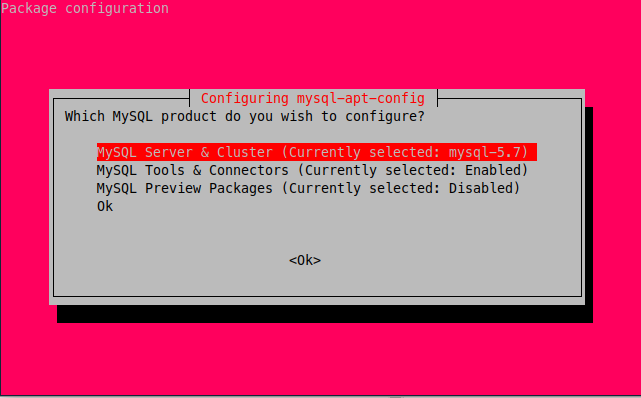
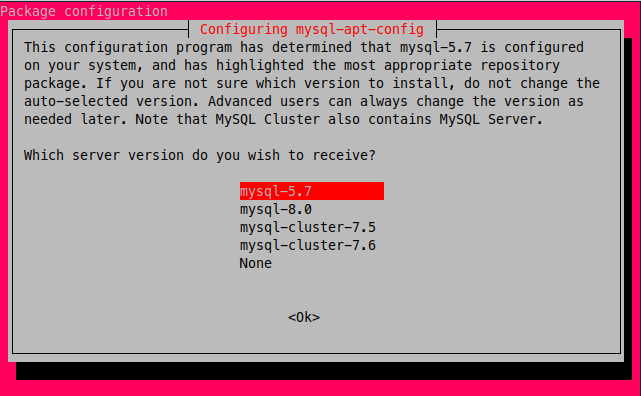
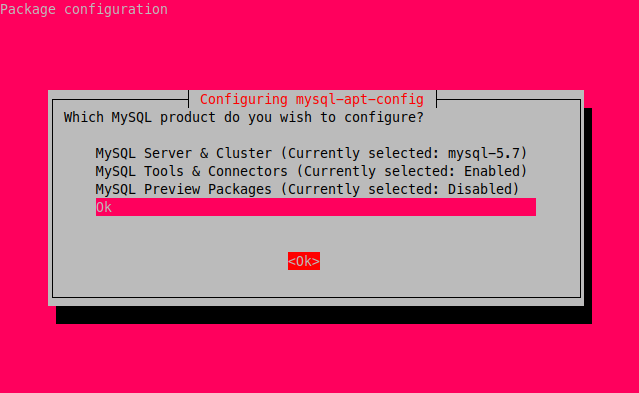
Si aparece el error:
Warning: apt-key should not be used in scripts (called from postinst maintainerscript of the package mysql-apt-config)
OK
Reinstala y vuelve al paso anterior:
sudo apt-get purge mysql-apt-config
- Actualizar el repositorio
sudo apt update
Comprobar la directiva de Ubuntu para la instalación del paquete MySQL.
sudo apt-cache policy mysql-server
La salida es:
mysql-server:
  Installed: (none)
  Candidate: 8.0.26-0ubuntu0.20.04.2
  Version table:
     8.0.26-0ubuntu0.20.04.2 500
        500 http://mirrors.digitalocean.com/ubuntu focal-updates/main amd64 Packages
        500 http://security.ubuntu.com/ubuntu focal-security/main amd64 Packages
     8.0.19-0ubuntu5 500
        500 http://mirrors.digitalocean.com/ubuntu focal/main amd64 Packages
     5.7.35-1ubuntu18.04 500
        500 http://repo.mysql.com/apt/ubuntu bionic/mysql-5.7 amd64 Packages
Copiar la versión e instalarla:
sudo apt install -y mysql-client=5.7.35-1ubuntu18.04
sudo apt install -y mysql-community-server=5.7.35-1ubuntu18.04
sudo apt install -y mysql-server=5.7.35-1ubuntu18.04
Prevenir la actualización del paquete:
Comprobar la versión instalada:
dpkg -l | grep mysql
Crear el archivo de configuración necesario para evitar la actualización de MySQL.
sudo nano /etc/apt/preferences.d/mysql
Pegar la versión que nos mostró el comando anterior:
Package: mysql-server
Pin: version 5.7.35-1ubuntu18.04
Pin-Priority: 1001

Package: mysql-client
Pin: version 5.7.35-1ubuntu18.04
Pin-Priority: 1001

Package: mysql-community-server
Pin: version 5.7.35-1ubuntu18.04
Pin-Priority: 1001

Package: mysql-community-client
Pin: version 5.7.35-1ubuntu18.04
Pin-Priority: 1001

Package: mysql-apt-config
Pin: version 0.8.12-1
Pin-Priority: 1001
sudo apt update


