
Skip to content
Code and Bytes Code and Bytes

Code and Bytes
Code and Bytes

Configurar ext de Callcentric en Asterisk

Posted on 13 September, 202113 September, 2021

Recientemente adquirí un número de Estados Unidos, a continuación muestro cómo configurarlo en Asterisk:

1. Configurar la troncal

Editar el archivo sip_custom.conf y agregar:

[callcentric]
disallow=all
type=peer
host=callcentric.com
fromdomain=callcentric.com
defaultuser=1777MYCCID
fromuser=1777MYCCID
secret=SUPERSECRET
insecure=port,invite
disallowed_methods=UPDATE
directmedia=no
videosupport=no
allow=ulaw
qualify=yes
context=from-callcentric

2. Editar el archivo sip_registrations_custom.conf y agregar:

register=1777MYCCID:SUPERSECRET@callcentric.com

Recordar cambiar 1777MYCCID y SUPERSECRET por los datos que entrega Callcentric

3. Configurar las llamadas entrantes:

Para configurar las llamadas entrantes hacia la extension 200 editar el archivo extensions_custom.conf

[from-callcentric]
exten => s,1,Dial(SIP/200)

Para verificar la conexión hay que ingresar en la consola asterisk -r el comando sip show registry

bcasterisk*CLI> sip show registry
Host                  dnsmgr Username       Refresh State       Reg.Time                 
callcentric.com:5060  N      1777MYCCID     44      Registered  Mon, 13 Sep 2021
1 SIP registrations.

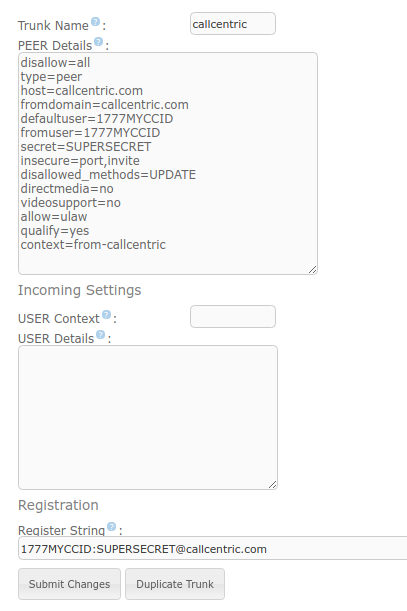
En mi caso me gusta configuarlo desde la interfaz gráfica de Issabel y quedaría de la siguiente forma:
Asterisk

Post navigation

Previous post
Next post

Related Posts

Samba en Issabel

Posted on 14 March, 20189 April, 2020

yum install samba samba-client samba-common nano /etc/samba/smb.conf Dentro de global [global] map to guest = bad user /bin/systemctl restart smb.service Luego se crean los puertos y se habilitan en el Firwall de Issabel

Read More

SOLVED: CDR Report Empty and Calls Recordings in Asterisk

Posted on 25 January, 202025 January, 2020

Edit cdr_adaptive_odbc.confnano /etc/asterisk/cdr_adaptive_odbc.conf Add [adaptive_connection] connection=asteriskcdrdb table=cdr usegmtime=no alias start => calldate unaswered= yes congestion= yes and reload

Read More

Cambiar la contraseña root de MySQL en Issabel

Posted on 28 September, 20199 April, 2020

A continuación muestro como cambiar la contraseña root de Mysql en Issabel Detener el servicio mysql systemctl stop mariadb Iniciamos el modo seguro: mysqld_safe –skip-grant-tables & Hacemos un login a MySQL sin password mysql -u root Actualizamos la contraseña update mysql.user set password=PASSWORD(“1notfound1”) where user=’root’; Cargamos los privilegios / permisos…

Read More

Leave a Reply Cancel reply

Your email address will not be published. Required fields are marked *

This site uses Akismet to reduce spam. Learn how your comment data is processed.

Buscar

Categorias

  • AI (2)
  • Asterisk (9)
  • Bases de datos (1)
  • DevOps (4)
  • Git (2)
  • HTML (1)
  • Laravel (6)
  • Linux (67)
  • MCP Server (1)
  • Mikrotik (3)
  • MySQL (5)
  • n8n (1)
  • Personal (4)
  • PHP (15)
  • Python (2)
  • Software recomendado (1)
  • Tips (1)
  • VSCode (4)
  • vTiger (4)
  • Windows (10)
  • Wordpress (4)
©2026 Code and Bytes | WordPress Theme by SuperbThemes